Zoom ZUM-2 Podcast Mic Pack USB Podcast Microphone Bundle - (B-Stock)-1

Zoom ZUM-2 Podcast Mic Pack USB Podcast Microphone Bundle - (B-Stock)

iCON P1-Nano DAW Control Surface-1

iCON Pro Audio P1-Nano Single-Fader USB-C DAW Control Surface

iCON Pro Audio P1-M Motorized 8-Fader USB-C DAW Control Surface

Home On Sale Now / Clearance DAW Controllers iCON Pro Audio P1-M Motorized 8-Fader USB-C DAW Control Surface
was $699.00 Special Price $549.00

USB-C DAW Control Surface, 8 Touch-Sensitive Motorized Faders, 4-Inch Color Touchscreen, Jog Wheel, 8 Dual-Function Encoders, Mackie Control & HUI, Expandable to 64 Channels

Availability: Special Order, Please Allow 2-4 Weeks For Delivery
SKU
P1-M

iCON Pro Audio P1-M Features:

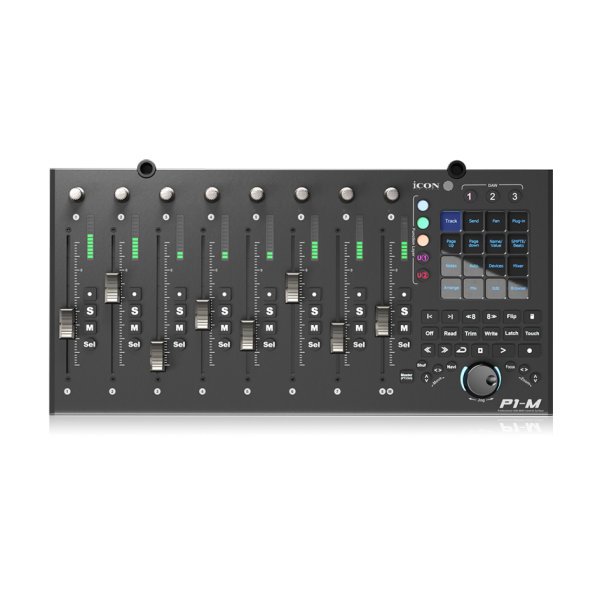
  • EIGHT MOTORIZED TOUCH FADERS — eight 100mm touch-sensitive motorized faders with 12-bit resolution recall your mix instantly and follow every automation move.
  • 4-INCH COLOR TOUCHSCREEN — a programmable 16-panel display with five color modes puts up to 80 DAW functions a fingertip away, arranged by drag and drop in the iMap editor.
  • MACKIE CONTROL AND HUI — universal Mackie Control (MCU) and HUI protocol support drops the P1-M straight into Pro Tools, Logic Pro, Cubase, Ableton Live, Studio One and more.
  • JOG WHEEL AND ENCODERS — a smooth-action jog wheel plus eight dual-function encoder knobs handle scrub, zoom, pan and plug-in parameters without touching the mouse.
  • EXPANDABLE TO 64 CHANNELS — add P1-X extender units to grow from eight faders up to 64 channels, depending on your DAW, for large mixes and film work.
  • USB-C AND THREE-DAW CONTROL — a single USB-C connection links to Mac, Windows and iOS, and DAW-select buttons switch between up to three sessions at once.

iCON Pro Audio P1-M: Eight Motorized Faders for In-the-Box Mixing

The iCON Pro Audio P1-M is an eight-fader motorized control surface that gives an in-the-box mix back the one thing a mouse took away - the ability to move more than one fader at a time. Its eight 100mm touch-sensitive faders travel at 12-bit resolution and motor back into position the instant you reopen a session or change banks, so the desk always shows the mix as it really is, not where you left the mouse. Land a finger on a cap and the DAW arms automation right there; lift off and it stops writing. With a 4-inch color touchscreen and eight push-encoders riding alongside on a single USB-C cable, mixing in Pro Tools or Logic stops being a click-one-thing-at-a-time chore and starts feeling like playing the console.

Faders That Remember the Mix

Twelve-bit resolution splits a full 100mm throw into 4,096 discrete steps, fine enough that a half-decibel vocal ride lands where you intend it and repeats when the motor recalls it. Every cap is touch-sensitive, so the surface knows the difference between a fader you are actively riding and one it should leave alone. Switch banks and all eight caps glide to the levels of the next eight channels; reopen yesterday's session and they snap straight to where automation left them. An engineer balancing a drum bus feels the relationship between kick, snare, and overheads in the hands instead of reading it off a screen.

4-Inch Touchscreen, Mapped Your Way

Above the transport sits a 4-inch, 16-panel color touchscreen that holds up to 80 commands across five color-coded modes, and the bundled iMap software lets you drag each command onto the panel where your hands expect it. A picture editor might load cut, fade, and marker tools onto one mode; a beatmaker keeps quantize, loop, and duplicate a swipe apart on another. Because the layout follows the workflow rather than a fixed template, the buttons you reach for most stop hiding behind menus. The result is a control set that reads like your own shorthand rather than a generic remote.

One Surface, Two Rigs, Thirteen DAWs

Communication runs over Universal Mackie Control (MCU) and HUI, the two protocols understood by Ableton Live, Cubase, Nuendo, Pro Tools, Logic Pro, Studio One, FL Studio, Bitwig, Reaper, Cakewalk, Digital Performer, Reason, and Tracktion Waveform. Dedicated DAW-select buttons keep as many as three of those sessions connected at once and swap the P1-M between them without re-patching a cable. Picture the engineer who cuts in Pro Tools at the facility and writes in Logic at home - the faders, encoders, and transport fall under the same fingers in both. Learning the desk once means never relearning it per project.

Jog Wheel, Encoders, and Transport Under Hand

Eight dual-function encoders turn to set pan or dial a plug-in parameter and press to commit the value, while a jog wheel handles scrub, search, and zoom without a trip to the trackpad. Illuminated keys cover play, stop, record, rewind, fast-forward, and loop, and every channel carries its own mute, solo, and record-arm alongside the read, write, touch, latch, and trim automation modes. Editing dialogue or shaping an EQ curve, you keep both eyes on the waveform and both hands on the surface. Nothing about the take pulls your gaze back to a cursor.

Grows to 64 Faders

Bank buttons walk the eight faders through a session in blocks of eight, which is plenty for a song but tight for a film reel. Add P1-X extenders and the surface widens to 16, 32, or as many as 64 physical strips, each new unit behaving exactly like the main one. A composer scoring to picture can lay orchestral stems out across a console-width wall of faders and touch any one of them instantly, rather than paging a single bank back and forth. The rig scales with the ambition of the project instead of capping it.

USB-C Simplicity and Two Footswitches

A single USB-C cable connects the P1-M to macOS, Windows, and iOS or iPadOS as a class-compliant device, so there is no driver to hunt down before the first session. Two 1/4-inch inputs accept User A and User B footswitches for hands-free punch-in or transport, freeing both hands to stay on the faders during a take. A songwriter tracking overdubs can drop into record with a foot and ride the vocal at the same time. One cable in, one workflow, nothing to configure.

Metal Build, Optional On-Surface Timecode

The chassis is metal, secured by a Kensington lock port and fed by a 12V/2.5A DC adapter, built to sit at the center of a working room. Down the line the optional D4T OLED module clips on to add channel names, values, and colors plus a timecode readout in SMPTE or bars.beats.ticks. For a home-studio producer today and a post engineer scoring to picture tomorrow, that means one surface that earns its keep now and grows into timecode work later. It is a flagship desk that meets you where you are and follows where you go.

More Information
MPN IPA-P1M
Color Black
Input USB-C, 1/4"
Power Source External Power Supply
Form DAW Control Surface
Output USB-C
On Promo No
UPC / EAN 4897022375744
Brand iCON Pro Audio
Product Condition New
Availability Out of Stock

iCON Pro Audio P1-M Specifications

Faders8 x 100mm touch-sensitive motorized, 12-bit resolution
Encoders8 dual-function knobs (rotate and push)
Touchscreen4-inch 16-panel programmable display, 5 color modes (up to 80 functions)
Jog WheelSmooth-action shuttle for search, scrub and zoom
TransportPlay, Stop, Record, Rewind, Fast Forward, Loop
DAW ProtocolsUniversal Mackie Control (MCU) and HUI
Simultaneous DAWsUp to 3
Footswitch Inputs2 x 1/4-inch (User A / User B)
ConnectivityUSB-C high-speed
ExpansionUp to 64 channels via P1-X extenders
Optional DisplayD4T OLED with SMPTE / beat-clock timecode
Power12V/2.5A DC external adapter
CompatibilitymacOS, Windows 10/11, iOS / iPadOS (class-compliant)
SecurityKensington lock port